
3. Package Management#
3.1. Course Outline#
Discussion of software installation workflows in Linux.
Debian and Ubuntu package structure and management.
Advanced Package Tool (
apt) for package installation, removal, searching, and querying.Debian package low-level tool (
dpkg) for direct package installation, removal, and querying.Red Hat Enterprise Linux (RHEL) package structure and management.
Dandified (
dnf), a yellowdog Updater, Modified (yum) for package installation, removal, searching, and querying.Red Hat Package Manager (
rpm) for direct package installation, removal, and querying.
3.2. The Purpose of Linux Packages#
In modern Linux distributions, software is compiled, structured, and distributed as compressed archives known as packages. These packages are hosted on remote repository servers (mirrors).
Linux package managers automate and maintain the following operational tasks:
Installing software: Fetching software components and placing binaries, libraries, and configuration files in standard filesystem directories.
Removing software: Safely deleting application files while preserving system stability.
Updating software: Upgrading installed applications and libraries to newer versions.
Repairing software: Fixing missing, damaged, or partially removed program files.
Reconfiguring software: Adjusting post-installation parameters and default configurations.
Verifying integrity: Validating installed files against cryptographic hashes to detect file corruption or unauthorized modification.
3.3. Package Formats and Tools Across Linux Distributions#
Different distribution families utilize specific packaging formats and package management utility stacks:
Debian / Ubuntu: Package extension
.deb| High-level tool:apt| Low-level tool:dpkgRed Hat / Rocky / Fedora: Package extension
.rpm| High-level tool:dnf(oryum) | Low-level tool:rpmArch / Manjaro: Package extension
.pkg.tar.zst| Package manager:pacmanGentoo: Source-based compilation management | Package manager:
portage(emerge)
3.3.1. Modern Application Packaging Utilities#
In addition to traditional system distribution packages, containerized and application-centric packaging frameworks exist:
Frameworks:
snap(Ubuntu) andFlatpak(Fedora, universal Linux desktop distribution).Sandboxing: Applications run in isolated user-space environments.
Self-contained Dependencies: All required runtime libraries are bundled inside the package, eliminating distribution-level dependency conflicts.
Use Case: Primarily targeted at desktop applications, utility tools, and specific third-party service deployments.
3.4. Linux Package Management Workflows#
+-----------------------------------------------------------------------------------+
|                           LINUX PACKAGE MANAGEMENT FLOW                           |
+-----------------------------------------------------------------------------------+
|                                                                                   |
|  [ Remote Repository ] <=================================> [ Remote Repository ]  |
|           |                                                         |             |
|           | High-Level (Resolves Dependencies)                      | High-Level  |
|           v                                                         v             |
|      +----------+                                              +----------+       |
|      |   APT    | (Debian / Ubuntu)                            | DNF/YUM  | (RedHat)|
|      +----------+                                              +----------+       |
|           |                                                         |             |
|           v Downloads .deb                                          v Downloads .rpm
|    +--------------+                                           +--------------+    |
|    | Local .deb   |                                           | Local .rpm   |    |
|    | Package File |                                           | Package File |    |
|    +--------------+                                           +--------------+    |
|           |                                                         |             |
|           | Low-Level (Direct Installation)                         | Low-Level   |
|           v                                                         v             |
|      +----------+                                              +----------+       |
|      |   dpkg    | (Debian low-level: dpkg)                    |   rpm    |       |
|      +----------+                                              +----------+       |
|           |                                                         |             |
|           +---------------------------+-----------------------------+             |
|                                       |                                           |
|                                       v                                           |
|                          [ Installed System Files ]                               |
|                          (/usr/bin, /etc, /lib, etc.)                             |
|                                                                                   |
+-----------------------------------------------------------------------------------+
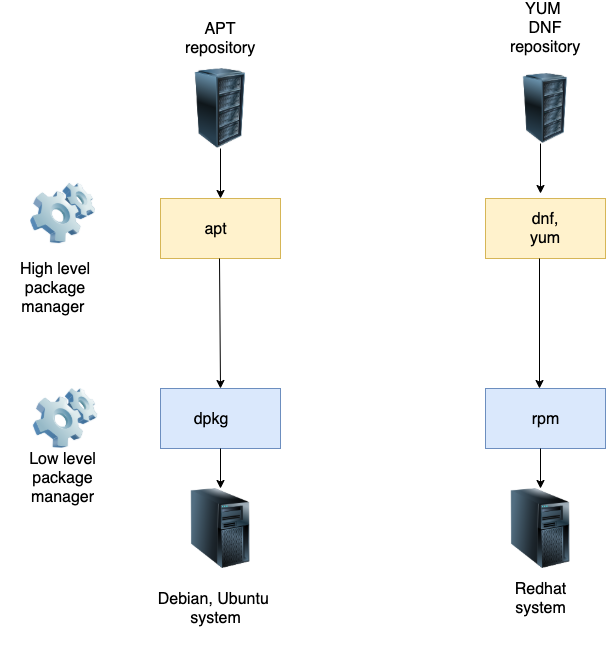
Accessible Image Description:
Overview: Visual workflow illustrating how high-level package tools (
aptanddnf) and low-level package installers (dpkgandrpm) interact with package archives (.deband.rpm) to install software components onto Debian/Ubuntu and Red Hat-based Linux systems.Setup: Two parallel processing pipelines are shown side by side. On the left, Debian/Ubuntu workflows query remote repositories using
apt, acquire.debfiles, and execute underlying installations viadpkg. On the right, Red Hat workflows query remote repositories usingdnf/yum, acquire.rpmfiles, and execute installations viarpm.Key Takeaways: High-level package managers streamline package administration by automatically fetching software from remote networks and resolving prerequisites. Low-level utilities manage local archive files directly on the host system without handling network resolution.
3.5. Debian and Ubuntu Packages#
Operating system components and software packages in Ubuntu/Debian are distributed as .deb archives.
A .deb package contains:
Executable Application Data: Program binaries, documentation, and libraries.
Control Information (
controlfile): Package metadata, vendor information, architecture constraints, and explicit dependency lists.Maintainer Scripts: Pre-installation (
preinst), post-installation (postinst), pre-removal (prerm), and post-removal (postrm) shell scripts.Hashes (
md5, sha1, sha256, sha512): Cryptographic checksums used to verify the integrity of installed files.
3.5.1. Package Naming Convention#
(package-name)_(source-version)-(package-revision)_(architecture).deb
Example: make_4.4.1-3_amd64.deb
Package name:
makeSource version:
4.4.1(GNU Make version)Package revision:
3(Debian/Ubuntu distribution build iteration)Target architecture:
amd64(64-bit x86 platform)
3.5.2. Ubuntu Repository Sections#
Official Ubuntu package archives are organized into distinct repositories based on software freedom and support status:
main: Free and open-source software officially supported and maintained by Canonical.restricted: Proprietary drivers and software essential for device functionality (e.g.,nvidia-driver-595).universe: Community-maintained open-source software. Updates and security fixes are provided by community volunteers rather than official distribution maintainers (e.g.,a2ps,xemacs21).multiverse: Software restricted by copyright or legal licensing issues (e.g.,dvd-slideshow).
Developers and third-party vendors may also offer custom package repositories known as Personal Package Archives (PPAs).
3.5.3. Debian Repository Sections#
Debian repositories categorize software under the following branches:
main: Fully compliant open-source software.contrib: Open-source software that depends on packages outside ofmain.non-free: Software with restrictive license conditions.non-free-firmware: Hardware firmware blobs with non-open licensing.
3.6. Hands-on Exercise: Deploying the kvm3 Virtual Machine#
Shutdown
kvm1and clone it to createkvm3:virsh shutdown kvm1 virt-clone -o kvm1 -n kvm3 -f /home/hostadm/KVM/kvm3.qcow2
Start the
kvm3virtual machine and open its console viavirsh:virsh start kvm3 virsh console kvm3
Update the system hostname inside
/etc/hostname:sudo -s nano /etc/hostname
Replace
kvm1withkvm3.Reset unique system identification parameters by running the resetting script:
vm_id_reset.sh
Reboot the virtual machine:
reboot
3.7. Hands-on Exercise: Installing Ubuntu Packages with APT#
Log into the
kvm3instance.Attempt to execute the
makeutility to verify its presence:make
System output:
The program 'make' is currently not installed.Install the
makeutility using APT:apt install make
Verify that
makeexecutes successfully following installation.Perform a simulated installation of a package using the
-s(dry-run) option:apt install -s netpbm
Note the prerequisite dependency library
libnetpbm10scheduled for automated installation.Download the
.debpackage file into the local APT cache without installing it:apt install -d netpbm
Inspect the downloaded package file in the APT cache directory:
ls -l /var/cache/apt/archives
Download a package directly into your current working directory:
apt download netpbm
Install the package:
apt install netpbm
Synchronize the local repository index and upgrade installed packages:
apt update
apt upgrade
Note: APT repository configuration and URL references are stored in /etc/apt/sources.list and within modular files in /etc/apt/sources.list.d/.
3.8. Hands-on Exercise: Removing Ubuntu Packages with APT#
Remove the
makepackage:apt remove make
Simulate package removal using the
-sdry-run parameter:apt remove -s netpbm
Observe that the dependent library
libnetpbm10remains on the system.Simulate removing a package along with all orphaned dependencies:
apt autoremove -s netpbm
Observe that both
netpbmandlibnetpbm10are scheduled for removal.Perform the automated removal of the package and its unneeded dependencies:
apt autoremove netpbm
3.9. Hands-on Exercise: Searching and Querying Ubuntu Packages with APT#
Refresh local package index files:
apt updateSearch for packages containing the keyword
makein their name or detailed description:apt-cache search make
Limit search queries to match package names only:
apt-cache search --names-only make
Filter search results precisely for package names beginning with
make:apt-cache search --names-only make | grep -w ^make
Display detailed package metadata for
make:apt-cache show make
List packages that rely upon
makeas a dependency:apt-cache showpkg make
List all direct dependencies required by
make:apt-cache depends make
3.10. Hands-on Exercise: Querying Repository Components#
Executing apt-cache show reveals the specific repository archive path (main, restricted, universe, or multiverse) hosting a package:
Check the repository directory for
make:apt-cache show make | grep Filename
Output:
Filename: pool/main/m/make-dfsg/make_4.4.1-3_amd64.debCheck the repository directory for
nvidia-driver-595:apt-cache show nvidia-driver-595 | grep Filename
Output:
Filename: pool/restricted/n/nvidia-graphics-drivers-595/nvidia-driver-595_595.71.05-0ubuntu0.26.04.1_amd64.debCheck the repository directory for
a2ps:apt-cache show a2ps | grep Filename
Output:
Filename: pool/universe/a/a2ps/a2ps_4.15.7-5_amd64.debCheck the repository directory for
dvd-slideshow:apt-cache show dvd-slideshow | grep Filename
Output:
Filename: pool/multiverse/d/dvd-slideshow/dvd-slideshow_0.8.6.1-2build1_all.deb
3.11. Hands-on Exercise: APT Security and Cryptographic Verification#
3.11.1. APT Verification Principles#
Downloaded package files are cached in
/var/cache/apt/archives/prior to installation.The repository index file (
Packages) contains cryptographic hashes (MD5, SHA-1, SHA-256, SHA-512) accessible viaapt-cache show.During installation,
apt installcomputes the local file hash and matches it against the hash published inPackages.Cached package indices reside in
/var/lib/apt/.The
Packagesindex filesha256checksums are stored inInReleasefile.The
InReleasemetadata file is cryptographically signed using GnuPG (GPG) keys maintained by repository owners.System keyrings containing trusted public keys are located in
/usr/share/keyrings/(on modern releases such as Ubuntu 26.04) or historically in/etc/apt/trusted.gpg.d/.
3.11.2. GPG Key Verification Test#
Simulate trust key corruption by removing local public keyrings:
rm /usr/share/keyrings/*Attempt to update repository indices:
apt updateObserve error messages indicating signatures cannot be verified due to missing public keys.
Restore the official security keyrings:
apt install ubuntu-keyring --reinstall
Re-verify repository signature authentication:
apt update
3.12. Hands-on Exercise: Adding an External APT Repository#
Custom repository sources can be appended to /etc/apt/sources.list or configured as independent files within /etc/apt/sources.list.d/.
Example Configuration: Adding the BeeGFS File System Repository
Download the repository source file into
/etc/apt/sources.list.d/:cd /etc/apt/sources.list.d wget https://www.beegfs.io/release/beegfs_8.3/dists/beegfs-noble.list
Download, dearmor, and store the vendor GPG public security key:
cd /tmp
wget https://www.beegfs.io/release/beegfs_8.3/gpg/GPG-KEY-beegfs
cat GPG-KEY-beegfs | sudo gpg --dearmor -o /etc/apt/keyrings/GPG-KEY-beegfs.gpg
Ensure
/etc/apt/sources.list.d/beegfs-noble.listreferences the stored GPG key ring:deb [signed-by=/etc/apt/keyrings/GPG-KEY-beegfs.gpg] https://www.beegfs.io/release/beegfs_8.3 noble non-free
Update APT package caches:
apt updateInstall the software utility from the new repository source:
apt install beegfs-tools
3.13. Hands-on Exercise: Installing Specific Package Versions with APT#
Query all repository versions available for a given package:
apt-cache show linux-image-virtual
Install a specific targeted package version using the
=syntax:apt install linux-image-virtual=7.0.0-31.31
3.14. Reviewing APT Transaction Logs#
Historical records of all apt actions are logged in /var/log/apt/history.log.
Interactively review full execution history:
less /var/log/apt/history.logView the most recent transaction entries:
tail -20 /var/log/apt/history.log
3.15. Hands-on Exercise: Querying and Managing Packages with dpkg#
List all packages currently installed on the local system:
dpkg -lQuery installation status and detailed metadata for specific packages:
dpkg -s make
dpkg -s tzdata
List all system files owned and installed by a package:
dpkg -L tzdata
Identify which package installed a specific system file (e.g.,
/bin/ls):dpkg -S /bin/ls
Reconfigure post-installation settings for an installed package:
dpkg-reconfigure tzdataInspect configured settings maintained by
debconf:debconf-show tzdataDirect manual installation of local
.debfiles usingdpkg:apt download make dpkg -i make_4.4.1-3_amd64.deb
List target files contained within an uninstalled
.debpackage archive:dpkg --contents make_4.4.1-3_amd64.deb
Verify installed package file integrity against original checksums:
dpkg -V make
(A clean check produces no console output).
Tamper with installed files to evaluate verification output:
echo '/* modified line */' >> /usr/include/gnumake.h
rm /usr/share/man/man1/make.1.gz
Re-run integrity verification to observe altered (
M) and missing (missing) files:dpkg -V make
Purge package binaries and configuration files:
dpkg --purge make
Extract
.debcontents into an uncompressed directory structure:dpkg -X make_4.4.1-3_amd64.deb PKGdir
View extracted directory hierarchy using
tree:apt install tree tree PKGdir
3.16. Red Hat Packages#
Packages within Red Hat Enterprise Linux (RHEL), Rocky Linux, and Fedora follow standard RPM naming protocols:
(package-name)-(source-version)-(package-release).(architecture).rpm
Example: nano-8.1-3.el10.x86_64.rpm
Package name:
nanoSource version:
8.1Release iteration:
3.el10(Build iteration 3 for Enterprise Linux 10)Target architecture:
x86_64(64-bit AMD/Intel architecture)
3.17. Hands-on Exercise: Deploying the rocky10-1 Virtual Machine#
Clone
rocky10into a new instance namedrocky10-1:virt-clone -o rocky10 -n rocky10-1 -f /home/hostadm/KVM/rocky10-1.qcow2
Boot
rocky10-1and connect to its virtual console:virsh start rocky10-1 virsh console rocky10-1
Update the hostname in
/etc/hostnametorocky10-1.Reset machine identification parameters and flush active networking leases:
sudo dnf install dbus-tools
sudo rm -f /etc/machine-id
sudo dbus-uuidgen --ensure=/etc/machine-id
sudo dbus-uuidgen --ensure
sudo ip addr flush dev enp1s0
Reboot the virtual machine:
sudo reboot
3.18. Hands-on Exercise: Package Management using DNF#
Dandified YUM (DNF) serves as the primary high-level package manager for modern RPM-based distributions.
Clear cached repository metadata:
dnf clean all
Install a package:
dnf install netpbm
Reinstall a package to repair damaged binaries:
dnf reinstall netpbm
Download an RPM package without running installation routines:
dnf download make
ls -l make*
Check for available package updates across enabled repositories:
dnf check-updateUpdate a single specified package:
dnf update tzdata
Perform a full system package upgrade:
dnf updateRemove installed software packages:
dnf remove netpbm
(Note:
dnf erase netpbmyields identical removal results).
3.19. Hands-on Exercise: Searching and Querying Packages with DNF#
Inspect package installation status:
dnf list make
dnf list coreutils
Note: Output displays package architecture, version, and source repository. Repository names prefixed with
@indicate installed packages.Display all installed system packages:
dnf list --installed
dnf repoquery --installed
Display packages available in configured repositories:
dnf list --available
dnf repoquery
Search repository catalog entries by keyword:
dnf search make
Query detailed metadata for a package:
dnf info make
List all software dependencies required by a target package:
dnf deplist make
Determine which package provides a specific system binary or file path:
dnf provides /usr/bin/ls
3.20. Hands-on Exercise: Managing DNF Repositories#
Repository configuration files are stored as .repo files in /etc/yum.repos.d/.
Display active (enabled) repositories:
dnf repolistStandard default repos include
BaseOS,AppStream, andExtras.Display inactive (disabled) repositories:
dnf repolist --disabled
Enable a disabled repository source,
crb(CodeReady Builder):dnf config-manager --enable crb
List packages hosted within a specific repository channel:
dnf list --repo crb
Add a third-party vendor repository file directly from a remote URL:
dnf config-manager --add-repo https://www.beegfs.io/release/beegfs_8.3/dists/beegfs-rhel10.repo
Import vendor public cryptographic signing keys:
rpm --import https://www.beegfs.io/release/beegfs_8.3/gpg/GPG-KEY-beegfs
Install software from the newly configured repository source:
dnf install beegfs-tools
Disable a repository channel:
dnf config-manager --disable beegfs
Remove a custom repository configuration permanently:
rm /etc/yum.repos.d/beegfs-rhel10.repo
3.21. Advanced DNF Functionalities#
Review transaction history records:
dnf history
Undo a specific prior transaction ID (e.g., transaction 10):
dnf history undo 10
Roll back system software state to a target transaction point (e.g., transaction 9):
dnf history rollback 9
Inspect aggregate package collections arranged by operational groups:
dnf group list
For comprehensive technical references, consult the Red Hat Managing Software with DNF Documentation.
3.22. Hands-on Exercise: Querying and Managing Packages with rpm#
List all RPM packages installed on the system:
rpm -qa | sort | less
Direct manual installation of a local
.rpmpackage file:rpm -ivh make-4.4.1-9.el10.x86_64.rpm
-i: install, -v: verbose output, -h: print hash marks showing progress.
Verify installation status of a package:
rpm -q make
Query package descriptive information:
rpm -qi make
Query all files installed on the system by a package:
rpm -ql make
Query which RPM package owns a specific system binary:
rpm -qf /bin/ls
List explicit capability requirements for a package:
rpm -qR make
Check integrity of installed package components:
rpm -V make
Modify installed files to test verification warnings:
echo '/* modified line */' >> /usr/include/gnumake.h
rm /usr/share/man/man1/make.1.gz
rpm -V make
Remove an installed RPM package directly:
rpm -e make
Query uninstalled local RPM archive files directly using
-p:rpm -qp make-4.4.1-9.el10.x86_64.rpm rpm -qlp make-4.4.1-9.el10.x86_64.rpm rpm -qip make-4.4.1-9.el10.x86_64.rpm